Reset Kafka Consumer Group Offsets: Latest, Timestamp, or Exact Offset
Reset Kafka offsets by timestamp, earliest, latest, shift, or CSV. Preview selected partitions, save old positions, and apply a reviewed plan.
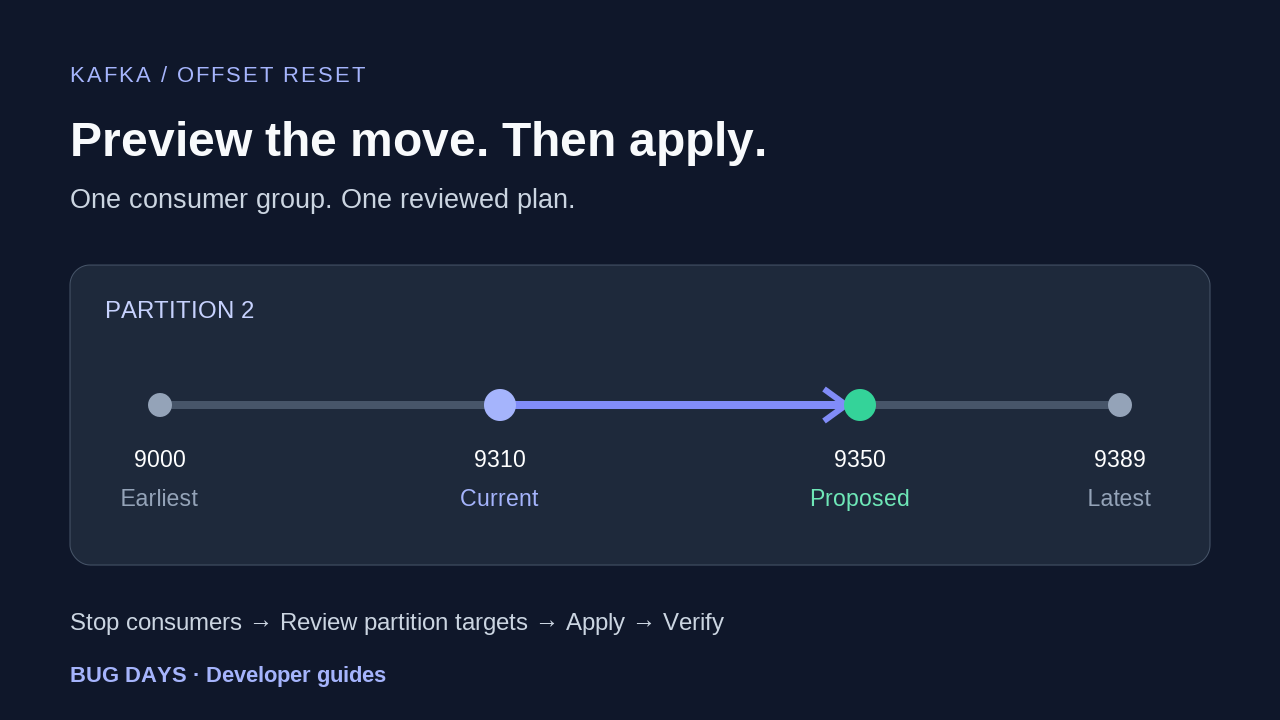
Reset Kafka consumer offsets by stopping the group, choosing a topic and partitions, previewing the new positions, and applying the reviewed plan. An offset reset changes where that group resumes; it does not delete records, copy messages, or undo side effects from earlier processing.
Investigate first: open a shareable, fictional lag report with one stalled partition and one unexpected member. It works without a cluster or local bridge and cannot execute an offset reset.
Understand what an offset reset changes
A group’s committed offset is its restart position for a particular topic-partition. Committing 9310 means resume at offset 9310, or the next available record if that position is no longer present. Offsets are not global message IDs: partition 0 and partition 2 can both contain an offset 9310 with unrelated data.
Moving backward can reprocess records and duplicate downstream actions. Moving forward can skip records for this group. Other groups retain their own positions. If you only want to inspect a suspect message, use the Kafka message browser; you do not need to move the application’s offsets.
All eight offset-reset modes
The Kafka consumer diagnostics tool exposes the following modes through the Bug Days Local Bridge. The command-line equivalents are part of Apache Kafka’s consumer-group operations.
| CLI option | Use it for | Important distinction |
|---|---|---|
--to-offset 9310 | An exact position | That number is applied to each selected partition, not to the topic globally. |
--to-earliest | Replay all retained data | Earliest is not necessarily zero. Deleted records cannot be restored. |
--to-latest | Skip the existing backlog | Latest is the end position, after the last currently available record. |
--to-current | Retain current commits | The bridge uses latest where no commit exists; inspect every row. |
--shift-by -100 | Move back 100 offsets | A positive shift moves forward. Offset gaps mean this is not exactly 100 messages. |
--to-datetime | Resume from a timestamp | Resolves a position independently for each partition. |
--by-duration PT2H | Resume from two hours ago | Relative to planning time, so a later preview can produce a different result. |
--from-file offsets.csv | Different exact offsets per partition | Review topic, partition, and offset in every CSV row. |
Preview an exact offset for selected partitions
Run commands from your Kafka distribution. Replace the illustrative broker, group, and topic with your own values. For authenticated clusters, add --command-config client.properties using an approved local configuration file; do not paste credentials into a shared command.
# Inspect membership before stopping the application.
bin/kafka-consumer-groups.sh --bootstrap-server localhost:9092 \
  --describe --group checkout-workers --members --verbose

# After stopping ALL instances, verify that the group is inactive.
bin/kafka-consumer-groups.sh --bootstrap-server localhost:9092 \
  --describe --group checkout-workers --state

# Preview only partition 2. This does not execute the reset.
bin/kafka-consumer-groups.sh --bootstrap-server localhost:9092 \
  --group checkout-workers --topic orders.events:2 \
  --reset-offsets --to-offset 9310 --dry-run
Use orders.events:0,2 to select partitions 0 and 2. Omitting the partition suffix selects the topic’s partitions. Check for old deployments, scheduled jobs, and autoscalers that might reconnect after you stop the visible application.
Save the old positions and apply a reviewed CSV
Capture the group’s offsets before changing anything. With the group inactive, this command exports the current positions for the selected topic. If any partition has no commit, --to-current may supply a fallback position; the export cannot preserve “no commit” as an offset.
bin/kafka-consumer-groups.sh --bootstrap-server localhost:9092 \
  --group checkout-workers --topic orders.events \
  --reset-offsets --to-current --export > before-offsets.csv
A separate, headerless reviewed-offsets.csv can contain this exact plan. The example changes only partition 2:
orders.events,2,9310# Review the file-based plan.
bin/kafka-consumer-groups.sh --bootstrap-server localhost:9092 \
--group checkout-workers --reset-offsets \
--from-file reviewed-offsets.csv --dry-run
# This command changes the group's stored offsets.
bin/kafka-consumer-groups.sh --bootstrap-server localhost:9092 \
--group checkout-workers --reset-offsets \
--from-file reviewed-offsets.csv --executeUsing exact positions avoids silently recomputing “latest” or “two hours ago” between review and execution. Confirm the CLI output and the group’s stored offsets, then restart the application and watch progress. Reverting to an old offset does not reverse database writes or notifications already produced, and retention may make an old position unavailable.
Reset by timestamp or duration without guessing the timezone
For the Kafka CLI, use an explicit UTC timestamp, such as --to-datetime 2026-10-01T12:00:00.000Z, and preview it with your installed version. In Bug Days, the datetime field is UTC; enter 2026-10-01T12:00:00Z. The duration field accepts examples such as PT30M, PT24H, or P7D.
The broker searches record timestamps, which can represent producer create time or broker append time depending on topic configuration. They are not necessarily the business-event time inside the JSON. If no matching timestamp exists, the bridge plans the current end offset. A reset specifies a start position only; for a bounded time window use the message browsing workflow.
Use the browser preview and share the diagnosis
- Start an up-to-date local bridge, connect your cluster, and select the group and topic in Kafka diagnostics.
- Take a snapshot and export the partition table. Stop every consumer in the group before preparing a reset.
- Enter a comma-separated partition selection, choose a mode, and preview. Compare the current, proposed, earliest, and latest positions.
- Apply the plan only after review. It expires after five minutes; the bridge rechecks that the group is inactive and its offsets have not changed.
- Restart consumers and take fresh snapshots. Share the report so teammates can compare what changed.
The bridge rejects targets outside the retained range instead of silently clamping them. CLI behavior can differ, so always read its preview. A shared Bug Days report omits connection credentials and anonymizes group/member identifiers; it does not carry an executable reset plan.
Why auto.offset.reset is not this operation
auto.offset.reset=earliest does not rewind a group with valid committed offsets. It controls the fallback when there is no usable position, as described in the Kafka consumer configuration. Change stored group positions deliberately when a replay is intended. For Kafka Streams applications, use the application-specific reset procedure as well: consumer offsets alone do not reset local state stores or internal topics.