Base64 GZip Decode Errors: Padding, Headers, and H4sI
Diagnose invalid Base64, incorrect GZip headers, truncated payloads, and unreadable output. Compare your input with a working, shareable example.
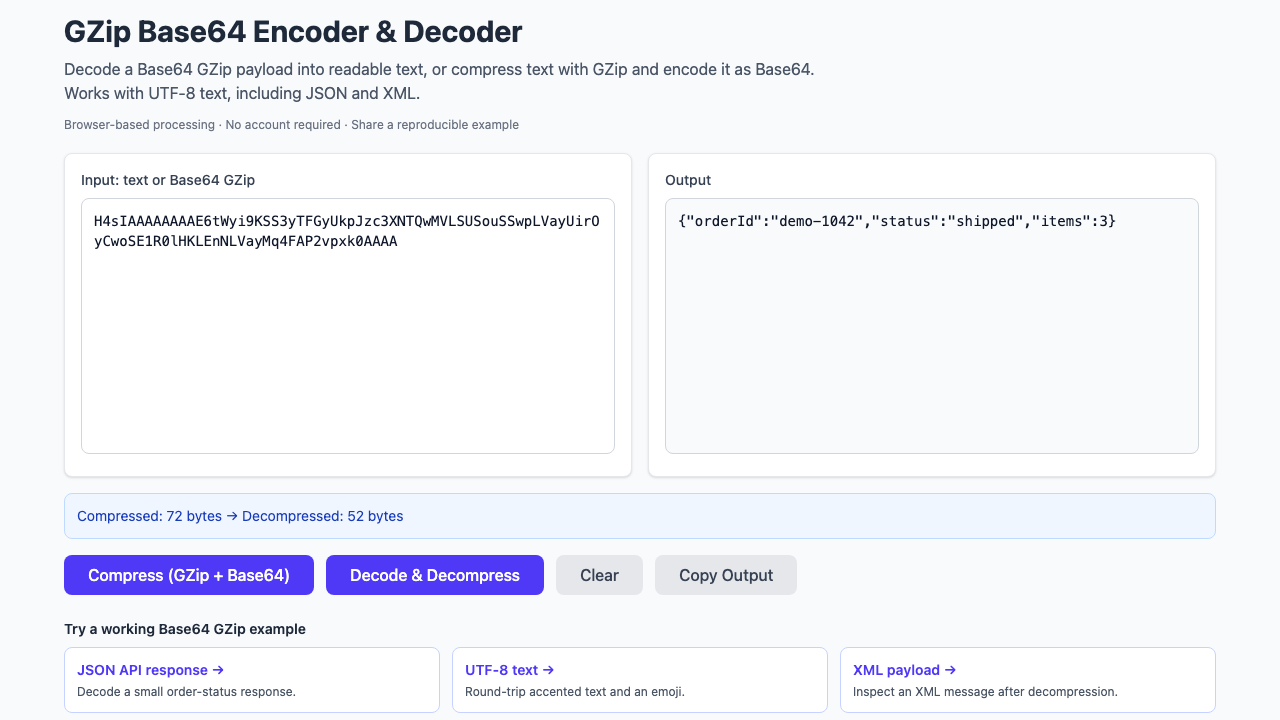
“Invalid data” does not tell you which transformation failed. A Base64 GZip decoder handles three different layers: the Base64 string, the compressed byte stream, and the character encoding of the decompressed result. Check them separately before changing your application's compression code.
First, establish a known-good input
Open this synthetic XML example in the GZip Base64 decoder. If it works, compare your payload with this one and continue through the checks below. If even this sample fails, reload the page and check whether browser extensions or network filtering prevented the tool's scripts from loading.
Base64-encoded GZip input
H4sIAAAAAAAAE7MpLkksKS22sylOLSrLTE61S0nNzddNLMi00YeJ2GSkJuaUZFTalRSVptrow3g2+lCtABem3ulDAAAAExpected decoded text
<status><service>demo-api</service><healthy>true</healthy></status>Open this decoding example → Try the reverse: compress this text →
These links carry the synthetic sample and operation in the URL. They do not depend on a 30-day stored short link.
1. Is the Base64 string complete and correctly copied?
Copy the field value rather than an entire JSON object. Remove surrounding quotation marks or a log prefix by selecting the original value again. If a logging system shortened the string or inserted an ellipsis, changing decoders will not restore the missing bytes.
Standard Base64 uses + and /; Base64url uses - and _. Padding conventions can also differ. Confirm the sender's format rather than guessing replacements. The two alphabets and padding rules are described in RFC 4648.
A plus sign can also be damaged by transport through a form or query parameter. Compare the value before and after that boundary. Do not repair spaces into plus signs unless you have established that this was the transformation.
2. Do the decoded bytes actually contain GZip?
For a small captured sample, this Python check decodes only the Base64 layer and prints the first three bytes. Replace encoded with the string you are investigating.
import base64

encoded = "H4sIAAAAAAAAE7MpLkksKS22sylOLSrLTE61S0nNzddNLMi00YeJ2GSkJuaUZFTalRSVptrow3g2+lCtABem3ulDAAAA"
raw = base64.b64decode(encoded, validate=True)
print(raw[:3].hex(" "))  # Expected: 1f 8b 08
Python's validate=True rejects non-alphabet characters, including line breaks. If your source deliberately wraps Base64, remove only that known wrapping first. See the Python decoder documentation.
| Observation | What to check next |
|---|---|
1f 8b 08 / Base64 prefix H4sI | Looks like a GZip header. Check that the rest of the stream is complete. |
| Readable JSON or XML immediately after Base64 decoding | The sender may not have compressed it. Skip GZip decompression. |
| A different binary header | Confirm whether the sender used zlib, raw DEFLATE, ZIP, or another format. |
GZip and zlib are distinct wrappers around compressed data. An “incorrect header check” can mean you chose a decompressor for the wrong wrapper, rather than that the Base64 was corrupt. Their formats are documented separately in RFC 1952 and RFC 1950.
3. Does the header survive, but decompression still fail?
Check the full string length at the producer and at the decoder. Log viewers, database columns, and copy operations can truncate the end while leaving the recognizable prefix intact. Ask for a complete sample rather than repeatedly appending padding.
A checksum or end-of-stream error is a reason to investigate corruption or truncation. It is not a reason to ignore the error and trust partial output. Keep the original sample unchanged while testing a copy.
4. Did decompression succeed, but the result looks wrong?
Confirm the original content type and character encoding. This browser tool displays output as UTF-8 text. A compressed image or a non-UTF-8 document does not become readable JSON just because GZip decompression succeeded.
If the text is readable but a JSON parser rejects it, you have reached a different problem. It might be XML, several newline-delimited JSON records, or malformed JSON from the producer. Use the appropriate parser after checking the decoded text.
Turn the failure into a useful question
Include the producer's compression and encoding steps, the exact error, and a small synthetic input that reproduces it. Add a Bug Days share link alongside the input and expected output. Someone helping you can then test the same operation without reconstructing the setup.
For a working producer to compare against, use the Python and Node.js GZip Base64 recipes. Share a synthetic reproduction rather than editing arbitrary characters inside a compressed production payload.