gRPC-Web vs Native gRPC: How Browser Testing Actually Works
Choose the correct browser transport for a gRPC service, understand when gRPC-Web works directly, and test native HTTP/2 gRPC through a local bridge.
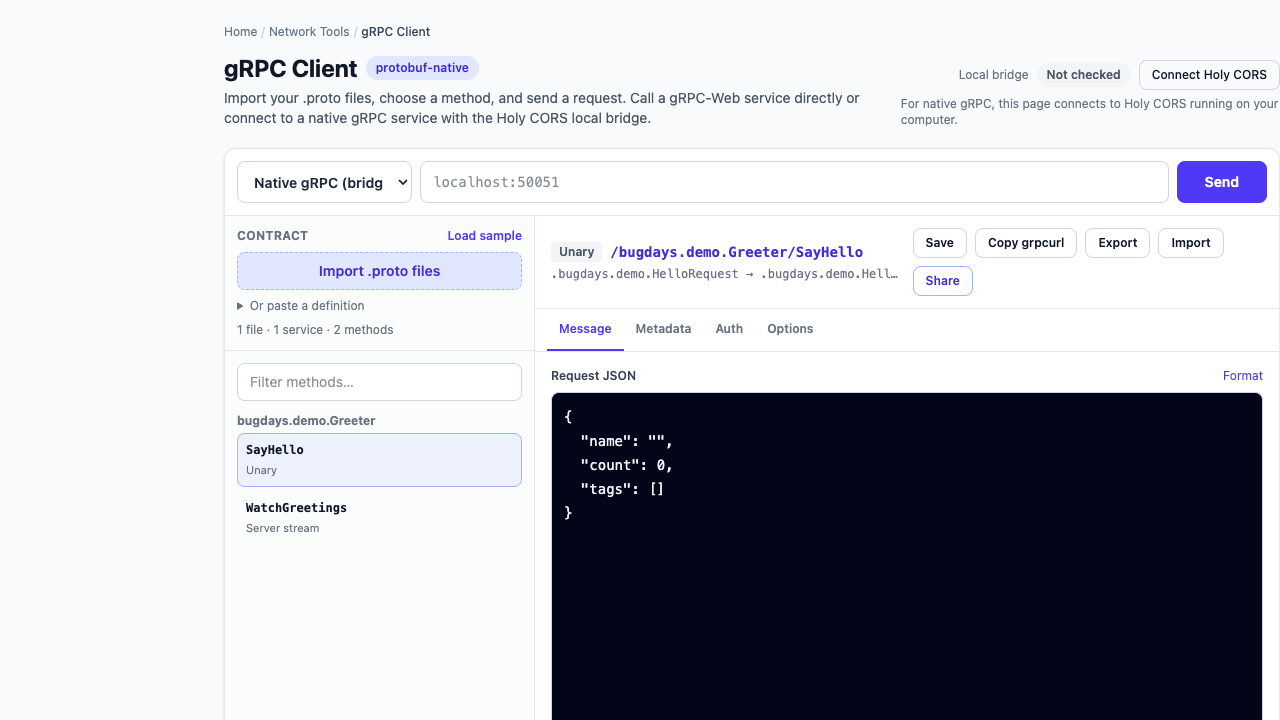
A failed browser call does not necessarily mean a gRPC server is down. “gRPC” and “gRPC-Web” are related transports, but they are not interchangeable endpoints. Choosing the wrong one can produce an HTTP error, a CORS message, undecodable bytes, or no useful response at all.
Start with one question: does the address accept gRPC-Web requests, or is it a native gRPC endpoint intended for SDKs and command-line clients?
Native gRPC and gRPC-Web compared
| Capability | Native gRPC | gRPC-Web |
|---|---|---|
| Typical client | Generated SDK, grpcurl, desktop client, service-to-service code | Browser application using a gRPC-Web client |
| Browser web APIs | Cannot initiate the complete native protocol directly | Designed for browser-compatible HTTP requests |
| Backend exposure | Server’s native HTTP/2 gRPC listener | A gRPC-Web-capable server or gateway |
| CORS | Not relevant to a native SDK; relevant to any browser-facing bridge | The browser-facing endpoint must allow the web origin, methods, and headers |
| Streaming | Unary, server, client, and bidirectional streaming depend on the method | Browser/client/gateway support varies; verify the exact mode |
The official gRPC-Web tutorial demonstrates a browser client calling a browser-facing endpoint that forwards to a native gRPC backend, including the need for CORS configuration.
Why a normal fetch request is not a native gRPC client
Native gRPC is more than “protobuf over HTTP.” A call has a fully qualified method path, framed protobuf messages, gRPC-specific headers, HTTP/2 behavior, and a final status with optional trailing metadata. Browser fetch does not expose the controls needed to behave like a general native gRPC client.
That is why a direct browser option should target gRPC-Web. A native endpoint needs a component outside the browser tab—a service gateway, application backend, desktop client, CLI, or a local bridge—to own the native gRPC connection.
Choose direct gRPC-Web when the service already supports it
Use direct mode when the public address is intentionally configured for gRPC-Web. Verify:
- the gRPC-Web URL, which may differ from the native host and port;
- allowed origins and preflight behavior;
- allowed request metadata such as
authorization; - which response and trailer headers the browser may expose;
- whether your gateway supports the RPC’s streaming shape.
A CORS error happens in the browser security layer. It does not tell you whether the backend method exists or whether the protobuf message was accepted. Test the public gRPC-Web address and the native backend as two separate hops when debugging a gateway.
Choose a local bridge for an existing native gRPC endpoint
A local bridge is useful when you control or are authorized to test a native gRPC service but do not want to install and configure a heavyweight API workspace. The browser can still provide the contract browser, JSON editor, history, sharing, and decoded results; the bridge performs the native HTTP/2 call on your machine.
With Bug Days, the flow is:
- Import or paste the service’s proto files in the browser.
- Select Native gRPC (bridge).
- Run Holy CORS locally using Homebrew, Docker, or the standalone binary.
- Enter the native target such as
localhost:50051. - Send the request and inspect decoded messages, response headers, trailers, and gRPC status.
docker run --rm \
  -p 127.0.0.1:2345:2345 \
  ghcr.io/bugdays-com/holy-cors:latest
Binding to 127.0.0.1 keeps that bridge port on the local computer. If the target service also runs on the host while the bridge runs in Docker, use host.docker.internal as the service hostname; Linux Docker may need an explicit host-gateway mapping.
Diagnose the layer that actually failed
| Symptom | Likely layer | Useful check |
|---|---|---|
| Browser preflight or CORS error | Browser-facing gRPC-Web endpoint or local-access permission | Origin, OPTIONS response, allowed metadata headers, and browser site permission |
| Bridge cannot connect | Local process, Docker networking, DNS, TCP, or TLS | Bridge status, target hostname/port, container-to-host address, and certificate trust |
UNIMPLEMENTED | gRPC routing or method selection | Package/service/method path and whether the gateway routes reflection separately |
UNAUTHENTICATED | Request metadata | Authorization key, token format, audience, and expiry |
| Messages followed by an error | Streaming RPC completion | Final status and trailing metadata, not only received messages |
What should stay local or be redacted
Proto files can reveal internal package names and capabilities. Metadata can contain bearer tokens, trace identifiers, tenant IDs, and routing keys. Request bodies may contain customer or production data. Use synthetic values where possible and inspect any request before creating a share link.
Bug Days omits authentication secrets from shares, exports, saved requests, and history. The page parses proto definitions and protobuf messages in the browser. When native mode is selected, the request goes through Holy CORS on your machine to the target you supplied; it is not sent through a hosted Bug Days relay.
The practical decision
- The service exposes gRPC-Web: connect directly and fix CORS on that browser-facing endpoint.
- The service exposes native gRPC: use a native SDK,
grpcurl, desktop client, internal gateway, or a local bridge. - You are unsure: ask the service owner which transport and address are supported; a proto file describes methods, not deployment topology.