How to Test a gRPC API: Proto Files, Metadata, and Streaming
A practical gRPC testing workflow: load a proto contract, choose a method, build protobuf data from JSON, send metadata, inspect trailers, and debug status codes.
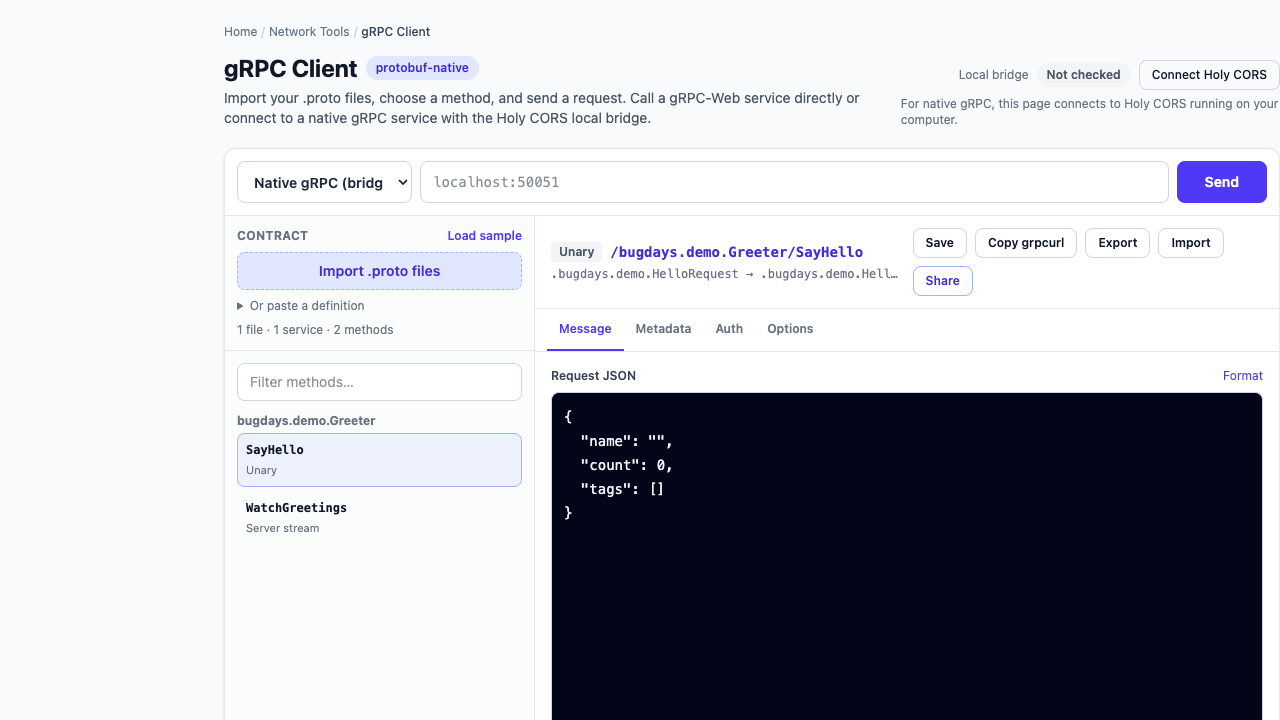
Testing a gRPC method is not the same as posting JSON to a URL. The method name comes from a service contract, the body is encoded with Protocol Buffers, authentication usually travels as metadata, and the final outcome is carried by a gRPC status—often in response trailers.
A dependable gRPC test preserves five pieces of evidence: the exact proto contract, fully qualified method, request message, metadata and deadline, plus every response message and final status.
What you need before calling a gRPC service
- Target: the hostname and port, such as
api.example.com:443orlocalhost:50051. - Transport: native gRPC or a gRPC-Web endpoint.
- Contract: the service’s
.protofiles, including imported message definitions—or server reflection when the service exposes it. - Method: the package, service, and RPC name.
- Call settings: TLS, metadata, authentication, and a realistic deadline.
Reflection helps tools discover a live contract, but it is not automatically enabled and some public services intentionally disable it. In that case, use the same version of the proto definitions as the deployed server. The official gRPC reflection guide explains why debugging tools depend on it.
Read the proto before writing the request
Consider this small contract:
syntax = "proto3";
package catalog.v1;

service Catalog {
  rpc GetProduct(GetProductRequest) returns (Product);
  rpc WatchProducts(WatchProductsRequest) returns (stream Product);
}

message GetProductRequest {
  string id = 1;
}

message WatchProductsRequest {
  repeated string ids = 1;
}

message Product {
  string id = 1;
  string name = 2;
  int64 inventory = 3;
}
The fully qualified unary method is catalog.v1.Catalog/GetProduct. Its input is a GetProductRequest, not an arbitrary JSON object. A JSON editor in a gRPC client is a human-friendly view; the client still validates the fields and serializes a binary protobuf message before sending it.
Test one unary RPC end to end
- Import every required proto file and confirm that imports resolve.
- Select
catalog.v1.Catalog/GetProduct. - Enter a request such as
{"id":"SKU-42"}. - Add the required metadata and authentication.
- Set a deadline appropriate for the environment.
- Send the call and retain the decoded response, headers, trailers, status, and elapsed time.
With grpcurl and a local plaintext service, the equivalent call is:
grpcurl -plaintext \
  -import-path . \
  -proto catalog.proto \
  -H 'authorization: Bearer REDACTED' \
  -d '{"id":"SKU-42"}' \
  localhost:50051 \
  catalog.v1.Catalog/GetProduct
Do not use -plaintext against a TLS endpoint. For private certificate authorities, configure the appropriate CA certificate rather than disabling verification. Keep real tokens out of shell history and shared examples.
Metadata is part of the request
gRPC metadata is a set of key-value pairs transported with the RPC. It commonly carries an authorization value, tenant identifiers, correlation IDs, feature flags, and trace context. Initial response metadata arrives before messages; trailing metadata arrives when the server closes the RPC.
Metadata keys are case-insensitive, the grpc- prefix is reserved, and binary metadata keys end in -bin. Servers may enforce conservative header-size limits, so a large copied token or certificate chain can fail before application code handles the request. See the gRPC metadata guide.
Set a deadline deliberately
A deadline says how long the client is willing to wait. Without one, a client may wait indefinitely. A deadline that is too short can produce DEADLINE_EXCEEDED even when the server eventually finishes; that matters especially for state-changing calls because cancellation does not roll back completed work.
Start with an environment-specific value, record the elapsed time, and investigate slow dependencies before simply increasing it. The official deadline guide recommends setting realistic deadlines explicitly.
Test server streaming as a sequence, not one response
WatchProducts accepts one request and returns zero or more Product messages. A good test checks:
- the order and content of every decoded message;
- whether the stream ends normally or is cancelled;
- the final gRPC status and message;
- initial and trailing metadata;
- the interval between messages, not only total duration.
A stream that delivered useful messages can still finish with a non-OK status. Do not treat “I saw data” as proof that the RPC completed successfully. gRPC’s core lifecycle documentation distinguishes unary, server-streaming, client-streaming, and bidirectional calls.
Interpret gRPC status before blaming the payload
| Status | First thing to verify |
|---|---|
UNAUTHENTICATED | The credential is missing, expired, malformed, or sent under the wrong metadata key. |
PERMISSION_DENIED | The caller was identified but lacks permission for this operation or resource. |
INVALID_ARGUMENT | The protobuf request is structurally valid, but a field value violates application rules. |
UNIMPLEMENTED | The target does not expose that method, or a gateway is routing the method path incorrectly. |
UNAVAILABLE | The service, upstream, DNS, TLS connection, or proxy is temporarily unavailable. Retry only when the operation is safe to retry. |
DEADLINE_EXCEEDED | The deadline, network latency, server work, and downstream calls. |
The complete meanings are defined in the official gRPC status-code reference. Keep the numeric code, status name, status message, and trailers together when reporting a failure.
A repeatable gRPC testing checklist
- Confirm the target and whether it speaks native gRPC or gRPC-Web.
- Use deployed proto definitions or working reflection.
- Select the fully qualified package, service, and method.
- Validate request fields before sending.
- Record non-secret metadata and a deliberate deadline.
- Inspect all messages, headers, trailers, and final status.
- Reproduce important failures with a saved request or redacted
grpcurlcommand.
Bug Days boundary: the browser client supports unary and server-streaming calls. Proto parsing, protobuf encoding, saved requests, and history stay in the browser. Authentication secrets are excluded from saved requests, history, shares, and exports.