Why JSON Numbers Change and Duplicate Keys Disappear When Formatting
Reproduce JSON.parse integer rounding and duplicate-key loss, then inspect and share JSON with exact digits, decimal notation, and every duplicate intact.
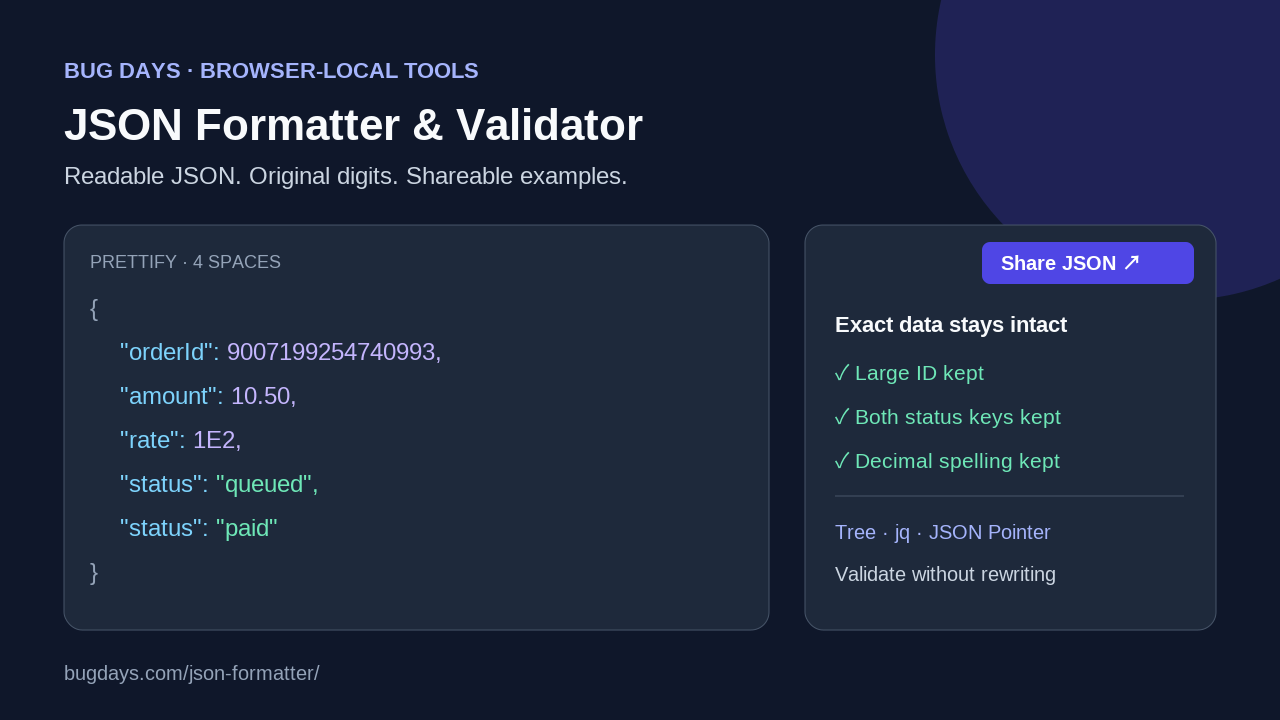
You copy an API response into a JSON formatter and an order ID changes by one. Or two status fields become one. Neither is a whitespace change: a parser converted the text into a different representation before printing it. Here is an example you can inspect without losing that evidence.
Try an exact-number and duplicate-key example
{"orderId":9007199254740993,"amount":10.50,"rate":1E2,"status":"queued","status":"paid"}Open the example in JSON Formatter ↗
The link selects four-space indentation and formats locally. The ID remains 9007199254740993, the amount remains 10.50, the exponent remains 1E2, and both status entries stay visible. Notes identify one large number and one duplicate key without silently fixing either.
Why JSON.parse can round a large integer
A JSON number is text. JavaScript normally reads it into a binary floating-point Number, which cannot distinguish every integer beyond 2^53 - 1. If a formatter serializes that Number, lost digits cannot be recovered.
JSON.parse('{"orderId":9007199254740993}').orderId;
// 9007199254740992
JSON.stringify(JSON.parse('{"amount":10.50}'));
// '{"amount":10.5}'
This is a JavaScript boundary, not a 53-bit limit in JSON itself. See RFC 8259’s number guidance and Number.MAX_SAFE_INTEGER. Decimal and exponent spellings can change even when the mathematical value does not.
Why duplicate JSON keys disappear
Member names should be unique for interoperable JSON. Duplicate names are nevertheless accepted by some syntax parsers. JavaScript’s ordinary object representation retains the last value; implementations can differ, as RFC 8259’s object guidance explains.
JSON.parse('{"status":"queued","status":"paid"}');
// { status: "paid" }
The Bug Days JSON formatter keeps both source entries. Tree & Fold displays both and lets you copy each exact value. Both have the same jq path and JSON Pointer because those paths identify a member name, not a particular duplicate occurrence. Do not assume a downstream lookup will see both.
Inspect the evidence without rewriting it
- Paste the original response or open its UTF-8 file.
- Select Validate to check syntax without changing the text.
- Select Prettify or Compact. Both copy original tokens and change only whitespace outside strings.
- Inspect the duplicate-key and large-number notes.
- Use Tree & Fold to copy values or paths; Undo restores the text before formatting.
String escapes and key order remain intact too. This is not a JSON canonicalizer. If a signature covers exact bytes, retain the original body: even whitespace changes can invalidate the signature.
Fix the producer, not just the display
If you control an API, return long identifiers as strings when consumers need every digit. Resolve duplicate names at the producer: which status is correct is a business decision. For decimal amounts, choose a representation consumers can process exactly.
Syntax validation is not contract validation. Use JSON Schema Doctor for required fields, types, and enums. Several documents separated by newlines belong in the JSONL and NDJSON viewer.
Share a small reproducer
Replace real identifiers and credentials with synthetic values, then select Share JSON. Embedded-data links carry the text and indentation in a URL fragment. Optional short links explicitly store the example for 30 days. Anyone with either link can read it; a teammate can inspect the same values instead of guessing from a screenshot.