Validate JSON Against a Schema: Find and Fix the Failing Field
Debug a JSON API response with four reproducible failures. Understand required fields, null, extra keys, local references, and structured-output schema checks.
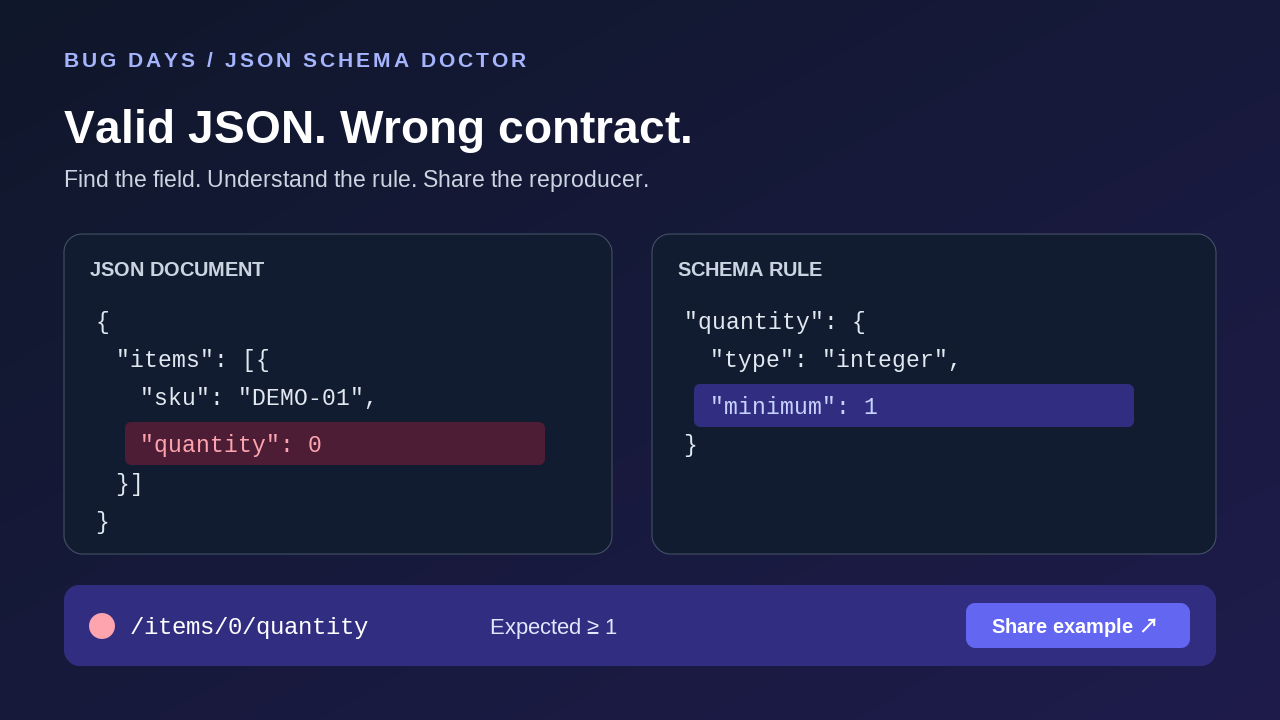
Your endpoint returns valid JSON, but the client still rejects it. Pretty-printing will not explain why "1042" is not an integer or why "PAID" fails a lowercase enum. You need to compare the response with its schema and find the exact rule that disagrees.
This walkthrough uses fictional order data. Open the failing example in JSON Schema Doctor to reproduce all four errors without an account, a backend, or an API key.
A valid JSON document with four contract errors
The response below parses correctly. Its problems are semantic: the type of an order ID, the spelling of a status, a nested quantity, and an unexpected debug field.
{
  "orderId": "1042",
  "status": "PAID",
  "items": [
    {
      "sku": "DEMO-01",
      "quantity": 0
    }
  ],
  "debug": true
}
Here is the matching contract. The nested item schema lives in $defs, and the array uses $ref to reuse it:
{
  "$schema": "https://json-schema.org/draft/2020-12/schema",
  "type": "object",
  "properties": {
    "orderId": {
      "type": "integer"
    },
    "status": {
      "enum": [
        "pending",
        "paid"
      ]
    },
    "items": {
      "type": "array",
      "minItems": 1,
      "items": {
        "$ref": "#/$defs/item"
      }
    }
  },
  "required": [
    "orderId",
    "status",
    "items"
  ],
  "additionalProperties": false,
  "$defs": {
    "item": {
      "type": "object",
      "properties": {
        "sku": {
          "type": "string"
        },
        "quantity": {
          "type": "integer",
          "minimum": 1
        }
      },
      "required": [
        "sku",
        "quantity"
      ],
      "additionalProperties": false
    }
  }
}
Run Validate. Select a finding to jump to its input line. Each finding also shows a JSON Pointer and the schema rule responsible for the error.
| Data pointer | What failed | Fix in this example |
|---|---|---|
/orderId | A quoted number is a string. | Use the number 1042. |
/status | Enum matching is case-sensitive. | Use "paid". |
/items/0/quantity | The quantity is below its minimum. | Use a quantity of at least 1. |
/debug | The root object disallows undeclared properties. | Remove the debug field. |
The first array item has index 0. In JSON Pointer, a property name containing / escapes it as ~1; a literal ~ becomes ~0. This keeps paths unambiguous even for unusual field names.
Check the repaired response
{
  "orderId": 1042,
  "status": "paid",
  "items": [
    {
      "sku": "DEMO-01",
      "quantity": 2
    }
  ]
}
Open the passing example. The schema has not changed; the response now satisfies it. Schema Doctor does not coerce strings into numbers, insert defaults, or delete extra fields. That matters when you are testing what the API actually returned.
Use JSON Diff to review the before-and-after response. If the document cannot even be parsed, start with the JSON Formatter instead: comments, trailing commas, and single-quoted keys are syntax problems, not schema failures.
Schema Doctor rejects duplicate keys, nonfinite parsed numbers, and integers outside JavaScript’s safe range rather than validating a silently rounded value. It uses JavaScript number arithmetic, not an arbitrary-precision numeric engine. For long identifiers, use strings if the API contract allows them.
Missing, optional, and null are three different things
Adding a name under properties describes its value when present. Only required makes that property mandatory. A nullable value does not make a key optional: "type": ["string", "null"] permits an explicit null, while required: ["name"] still insists the key exists.
When a required key is missing there is no value to highlight. The validator points to the containing object and reports the missing field’s path. Decide whether the producer should supply the field or the contract should allow omission; changing the schema just to make a sample pass can hide a real API regression.
Choose the dialect before debugging array rules
The $schema declaration identifies a JSON Schema dialect. Draft 7, 2019-09, and 2020-12 are supported here. If you leave out the declaration, Auto uses 2020-12. Choosing a conflicting dialect is reported, rather than silently interpreting your rules differently.
Tuple syntax is a common trap: Draft 7 uses an array of schemas under items; 2020-12 uses prefixItems. Merely replacing the draft URL is not a schema migration. See the JSON Schema 2020-12 specification overview for the dialect’s changes.
Formats are another source of differences between validators. By default this tool treats format as an annotation. Enable Assert formats when you want supported email, date-time, URI, and other format checks. A format assertion is still not proof that a mailbox exists or that a URL is reachable.
Resolve references without a schema server
The example’s #/$defs/item reference stays inside one document. For separate files, give the root schema an absolute $id, such as https://example.com/schemas/order.json. A reference to item.json then resolves to https://example.com/schemas/item.json.
Add the local item file with that exact absolute $id under Local reference schemas. The URL serves as an identifier; Schema Doctor does not request it over the network. Missing references remain errors until you supply their schemas. This keeps results repeatable and also works with internal schema identifiers.
Why anyOf and oneOf errors can look noisy
anyOf succeeds when at least one branch succeeds. oneOf requires exactly one, so a value matching two overlapping branches fails too. Inspect the branch-specific findings at the same data path instead of treating the summary error as another independent field problem.
For example, oneOf: [{"type":"number"},{"type":"integer"}] rejects 2: that value is both a number and an integer. Use mutually exclusive branches when exclusive matching is what the contract needs.
Separate JSON Schema validity from structured-output compatibility
A general-purpose schema can be valid and still be unsuitable for a model’s structured-output API. The optional OpenAI profile checks a reviewed set of strict-output rules, including the object root, required fields, and closed objects. It also flags selected unsupported or unreviewed keywords.
Open the structured-output example. The document satisfies the original schema, but the provider checks identify contract changes to review. The proposed-edits panel shows each old and new rule before applying it. No arbitrary constraints are stripped, and optional fields are not silently made nullable.
The profile is dated October 5, 2026. It is not a full compatibility certification: fine-tuned/model-specific restrictions and reference-expanded nesting limits are outside its scope. Check the official supported-schema documentation and test the exact model and endpoint you intend to use. This tool never calls that API.
Share a small reproducer, not the whole production response
Keep only enough data to demonstrate the failure. Replace personal values and credentials with fictional ones, then confirm the error still reproduces. Share example displays the exact schema, document, reference files, and settings that the link will contain.
An embedded link carries the example in its URL fragment. A stored short link is an explicit upload of that share state. Neither is private storage: anyone with the link can read it. A downloaded diagnosis omits the original documents but still contains property paths and error text, which should also be reviewed.
For application code derived from a representative response, continue with the TypeScript, Zod, and Pydantic generator. Inference from one example is a starting point; schema validation is how you check an explicit contract.