How to Turn SQL DDL into an ER Diagram and Data Dictionary
Extract a schema-only database definition, visualize foreign-key relationships, add useful annotations, and export documentation without connecting another service.
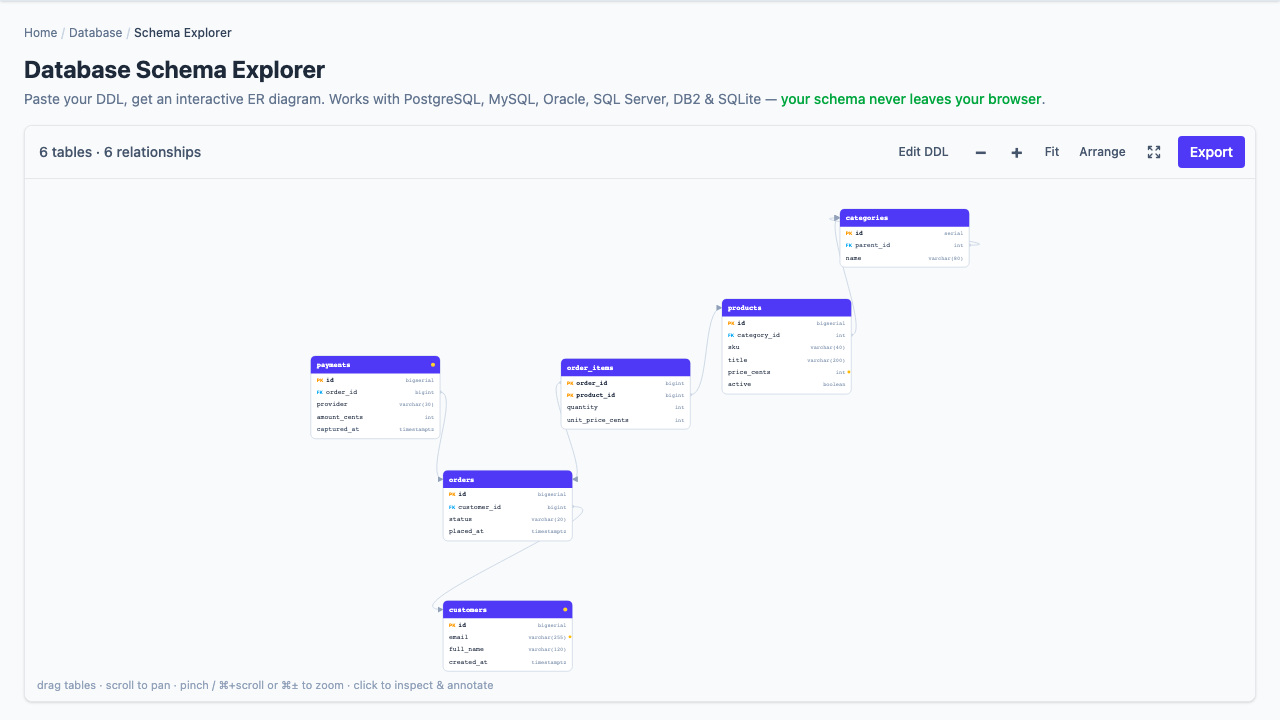
The most accurate database documentation is often trapped in the database itself: table definitions, keys, constraints, and comments. A stale diagram can still look convincing, which makes it dangerous. Starting from current DDL gives you an evidence-based picture without granting a diagramming service database access.
The workflow: export schema definitions without data, parse tables and foreign keys into an ER diagram, add the business meaning SQL cannot express, and publish both the visual model and a searchable data dictionary.
Export structure, not production rows
For PostgreSQL, a plain-text schema-only dump provides the definitions needed for reverse engineering:
pg_dump --schema-only --no-owner --no-privileges \
  --file=schema.sql database_name
--schema-only excludes table data. --no-owner and --no-privileges reduce deployment-specific noise when the goal is documentation. Review the output anyway: comments, object names, defaults, and extensions can reveal internal details.
Other databases provide similar “DDL only” or “no data” export options through their command-line clients and administration tools. Prefer plain SQL containing CREATE TABLE, constraints, indexes, comments, and later ALTER TABLE ... FOREIGN KEY statements.
A small schema already tells a story
CREATE TABLE customers (
  id bigint PRIMARY KEY,
  email varchar(320) NOT NULL UNIQUE
);

CREATE TABLE orders (
  id bigint PRIMARY KEY,
  customer_id bigint NOT NULL,
  status varchar(30) NOT NULL,
  placed_at timestamp NOT NULL,
  CONSTRAINT fk_orders_customer
    FOREIGN KEY (customer_id) REFERENCES customers(id)
);
From this alone, a parser can identify two entities, their columns, primary keys, uniqueness, required fields, and the child-to-parent relationship from orders.customer_id to customers.id. It cannot infer what “status” values are legal unless the DDL includes a check constraint, enum, lookup table, or comment.
Read relationships in both directions
A foreign key has two useful narratives:
- From the child: every order’s
customer_idrefers to an existing customer. - From the parent: a customer may be referenced by many orders.
Nullability affects the story. A nullable foreign key makes the association optional at the database level. Uniqueness can turn a many-to-one shape into one-to-one. Composite foreign keys must be interpreted as a set rather than as unrelated columns.
The diagram is navigation; the dictionary is explanation
An ER diagram answers “what connects to what?” A data dictionary should answer the questions the names and types leave unresolved:
- What business concept does this table represent?
- Which system owns each field?
- What are the allowed states and transitions?
- Does a timestamp mean event time, ingestion time, or last update?
- Is a value sensitive, derived, deprecated, or safe for analytics?
“Customer’s email address” merely restates customers.email. “Normalized login identifier; changed only through verified-address workflow; restricted personal data” is useful documentation.
Choose exports for the next reader
| Export | Best destination | Why |
|---|---|---|
| Markdown dictionary | Repository docs, wikis, architecture reviews | Readable in diffs and searchable |
| Mermaid ER diagram | Markdown platforms that render Mermaid | Diagram source stays versionable |
| JSON model | Automation and custom generators | Preserves parsed structure for another tool |
| COMMENT SQL | The database catalog | Keeps descriptions close to the schema |
What static DDL cannot prove
DDL is strong evidence of declared structure, not the entire data model. Application-enforced relationships, dynamic SQL, triggers, views, ORM inheritance, cross-database references, and conventions without constraints may not appear as ER edges. A missing foreign key can mean “no relationship,” or merely “a relationship the database does not enforce.”
Label inferred or application-level relationships explicitly rather than drawing them as though they were declared constraints.
Keep documentation reviewable
- Store the schema extraction command next to the documentation.
- Regenerate the model after migrations.
- Review diagram changes in the same pull request as schema changes.
- Assign owners for business descriptions, not only SQL definitions.
- Keep sensitive examples and real row data out of the documentation artifact.
Why browser-only matters here: the Bug Days explorer parses pasted DDL locally and never connects to the database. You control exactly which definitions enter the workspace.