Base64 vs Base64URL: Padding, UTF-8, JWTs, and File Decoding
Compare Base64 and Base64URL alphabets, fix padding, decode JWT segments, and preserve UTF-8 or file bytes with tested JavaScript examples.
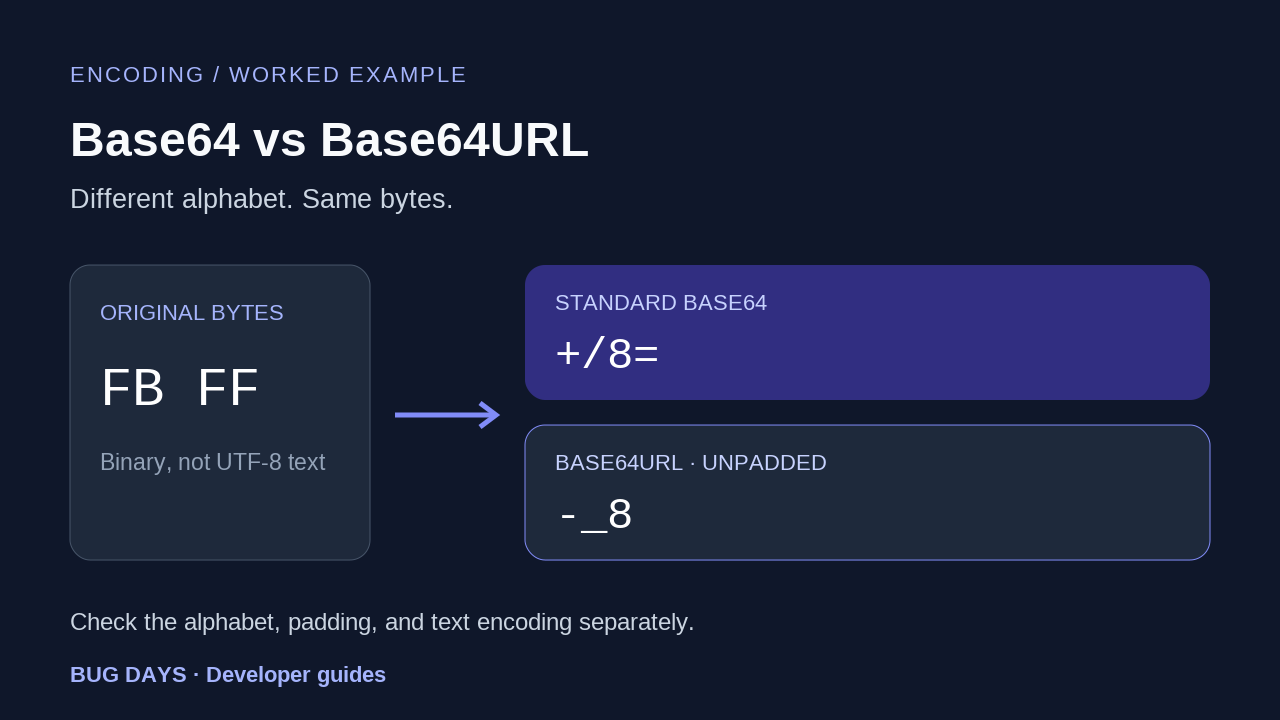
Base64 and Base64URL encode the same bytes with slightly different alphabets. Standard Base64 uses + and /; Base64URL uses - and _. Padding and text encoding are separate questions. Choose the alphabet first, recover the original bytes, and only then interpret them as UTF-8, a file, or compressed data.
Try and share: decode a UTF-8 example or normalize a Base64URL value. Both links contain fictional sample data and restore the operation automatically.
Try a UTF-8 Base64 round trip
Paste Hello, café ☕ into the Base64 encoder and decoder and choose Encode UTF-8 → Base64. The result is SGVsbG8sIGNhZsOpIOKYlQ==. Decode that value to recover the exact text, including the accented character and emoji.
btoa('café') actually succeeds, but treats é as the single byte e9 rather than the UTF-8 bytes c3 a9. Its output, Y2Fm6Q==, is therefore not UTF-8 Base64 for that word; the UTF-8 result is Y2Fmw6k=. Characters outside the byte range, such as ☕, throw instead. Encode text with TextEncoder before calling btoa.
function encodeUtf8(text) {
  const bytes = new TextEncoder().encode(text);
  let binary = '';
  for (const byte of bytes) binary += String.fromCharCode(byte);
  return btoa(binary);
}

function decodeUtf8(base64) {
  const bytes = Uint8Array.from(atob(base64), c => c.charCodeAt(0));
  return new TextDecoder('utf-8', { fatal: true }).decode(bytes);
}

const encoded = encodeUtf8('Hello, café ☕');
console.log(encoded);
console.log(decodeUtf8(encoded));
This small-payload example avoids spreading a large byte array into a function call, which can exceed JavaScript’s argument limit. For large files, use a binary/file workflow rather than repeatedly constructing strings. The strict UTF-8 decoder reports invalid bytes instead of silently inserting replacement characters.
Base64URL is not a different payload format
For a visible alphabet difference, encode the two bytes fb ff. They are binary data, not valid UTF-8 text:
original bytes:  fb ff
standard Base64: +/8=
Base64URL:       -_8=   (padded)
Base64URL:       -_8    (unpadded)
RFC 4648 defines both alphabets. Base64URL does not universally forbid padding; the protocol using it decides whether padding is required or omitted. Do not change a signed token’s representation in place just to make it look consistent.
Use the tool’s Base64URL ↔ Base64 action to normalize either form. To inspect a complete token, use the JWT decoder; it separates the header, claims, and signature rather than treating the whole token as one Base64 string.
Restore missing padding without accepting damaged input
After validating the unpadded alphabet, count the characters modulo four. A remainder of two needs ==; three needs =; zero needs nothing. A remainder of one cannot encode a complete byte sequence. Appending arbitrary padding cannot repair a truncated payload.
function base64UrlToBase64(value) {
  // This function deliberately accepts UNPADDED Base64URL only.
  if (!/^[A-Za-z0-9_-]*$/.test(value) || value.length % 4 === 1) {
    throw new Error('Invalid unpadded Base64URL');
  }
  const standard = value.replace(/-/g, '+').replace(/_/g, '/');
  const padded = standard + '='.repeat((4 - standard.length % 4) % 4);
  // Reject nonzero unused bits rather than silently normalizing them.
  if (btoa(atob(padded)) !== padded) throw new Error('Noncanonical Base64URL');
  return padded;
}
console.log(base64UrlToBase64('-_8')); // +/8=
For an API accepting padded input, validate the allowed placement and count of existing padding too; do not indiscriminately strip punctuation. If a query parser changed + to a space, fix how the producer URL-encodes the parameter or use the expected Base64URL contract.
Decode a JWT segment, not the whole token
A compact signed JWT normally has three dot-separated segments: header, payload, and signature. The header and payload contain Base64URL-encoded JSON. For example, eyJzdWIiOiIxMjMifQ decodes to {"sub":"123"}. Dots are separators, not Base64 alphabet characters. Encrypted compact JWTs use a different, five-part layout; decoding is not decryption.
Readable claims do not prove authenticity. Verifying the signature requires the intended algorithm, trusted key, and application checks such as issuer, audience, and expiry. The JWS specification explains the signed representation. Share a made-up token when reporting an encoding problem, not a working login token.
Encode a file as bytes, not as text
Images, certificates, compressed payloads, and other files need a binary read. Choose Encode local file; the page reads the bytes on your device and produces Base64. Do not decode those bytes into text unless you know their character encoding. A binary-looking result is often correct.
A data URI has a prefix such as data:image/png;base64,. The decoder accepts that form and removes the prefix before decoding the payload. For image workflows, continue to the image-to-Base64 converter.
Not every data URI uses Base64: the ;base64 marker matters. Likewise, a certificate’s PEM boundaries are framing around encoded certificate bytes. Use the certificate inspector to interpret X.509 fields rather than expecting a DER certificate to become readable text.
Recognize compressed Base64
Many GZip byte streams start with hexadecimal 1f 8b 08, commonly rendered as H4sI in Base64. Base64 decoding succeeds but produces compressed bytes—not readable text. Send that value to the GZip Base64 decoder, which performs the second decompression step.
Share a synthetic reproducer
A shared link can preserve the input and selected conversion operation. That is helpful for a small synthetic example in a ticket or technical question, but it is not a secret store: anybody with the link can read its included input. Replace real API tokens, customer values, and private file contents before sharing.
Include both the encoded value and expected bytes or text in the ticket, with the runnable link beside them. That preserves the question even if the reader cannot open the tool. For compressed Java payloads, continue with the Java GZip Base64 example.